

















The WhatsApp CRM: Turning Browsers into Buyers
Beyond the “Is This Still Available?”
Every small dealer knows the struggle. You list a car, and within ten minutes, your WhatsApp is flooded with five versions of: “Hi, is this still available?” followed by radio silence.
Most dealers treat these as a nuisance. But the most successful dealers treat them as a pipeline. If you are using your personal WhatsApp or even a standard Business account without a system, you are leaving money on the table. You need to treat WhatsApp like a Customer Relationship Management (CRM) tool.
Here is how you can use simple, built-in features to stop losing leads and start closing them.
Organize Your Leads with Labels
WhatsApp Business has a secret weapon that most dealers ignore: Labels. You don’t need expensive software to manage your sales; you just need to categorize your conversations so no one slips through the cracks.
Try setting up these four simple labels:
- New Inquiry: For anyone who just messaged about a specific car.
- Awaiting Documents: For buyers who are interested but need to send their license or proof of residence.
- Viewing Arranged: For buyers who have confirmed a time to come to the lot.
- Sold/Follow-up: For after-sales check-ins to build long-term trust.
By assigning these labels, you can look at your chat list and instantly see exactly where every buyer is in the “funnel.”
The Power of “Quick Replies”
Speed is everything in the car trade. If a buyer messages three dealers at once, the one who replies first with the most professional information usually wins the sale.
Use the “Quick Replies” feature to save your most common answers:
- The “Location” shortcut: Type
/locto instantly send your Google Maps pin and address. - The “Paperwork” shortcut: Type
/docsto send a list of required documents for finance or registration. - The “Viewing” shortcut: Type
/timeto send your business hours and a prompt to confirm a test drive.
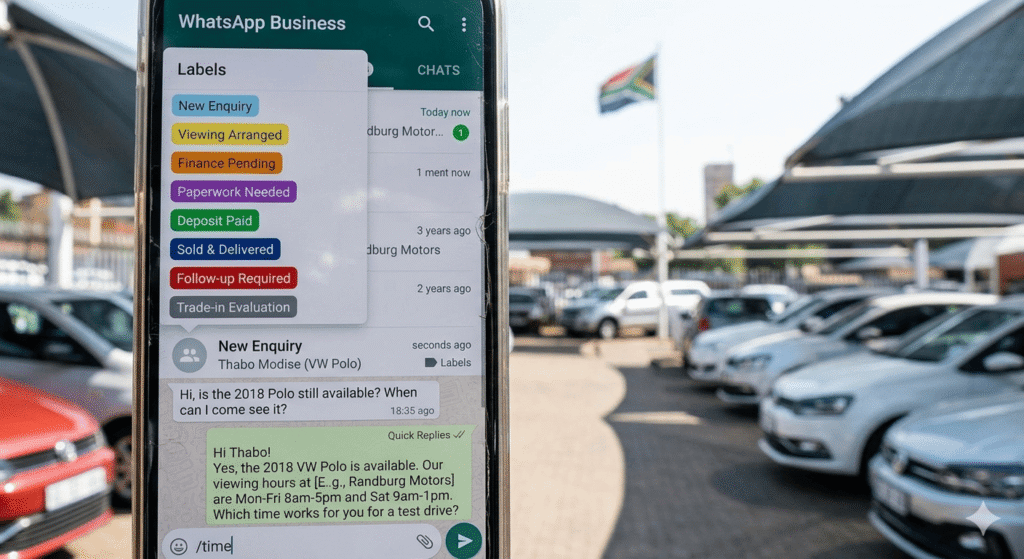
Organize your inbox in seconds. Never forget a lead again.
Moving Window Shoppers to High-Intent
A “window shopper” is just a buyer who hasn’t been given enough confidence yet. Your WhatsApp CRM helps you move them from “just looking” to “ready to buy”:
- Use Status Updates as a Billboard: Don’t just post your cars to your feed; post your wins. When you sell a car, post a photo of the happy customer taking delivery. It creates social proof that tells the “window shoppers” you are a legitimate, active dealer.
- The “Nudge” Strategy: If a lead goes quiet for 48 hours, don’t just let them vanish. Use your label to filter for “New Inquiries” and send a polite follow-up: “Hi, just checking in to see if you have any more questions about the [Vehicle Model]?”
- Professionalize the Experience: When you link your Car Listing page in your responses, you give them a professional, verified place to review the car details while they chat with you. It validates your authority as a dealer.
Don’t Let Leads Die in Your Inbox
Your WhatsApp is your most valuable business tool. It’s where your deals are born, negotiated, and closed. By treating it like a professional CRM rather than just a messaging app, you turn your inbox from a source of stress into your most powerful sales engine.
Start labeling your chats, use your quick replies, and watch your conversion rate climb.